Lost Life Game Guide 2026: Beginner’s Step-by-Step Tutorial
Have you ever wondered why Lost Life feels so mysterious and unpredictable?
What starts as a simple story quickly becomes a chilling experience where every decision shapes your fate.
Through experience, I’ve identified five simple steps to play effectively without confusion. The story holds a major mystery that’s best discovered naturally rather than spoiled beforehand, preserving the excitement of unexpected twists.
Learn How to Play Lost Life Game?
This Android game blends adorable graphics with surprisingly deep psychological elements that shift depending on the choices you make. For the smoothest gameplay grab the newest version from reliable download sites.Android offers smoother gameplay than PC or iOS versions.
Quick Setup
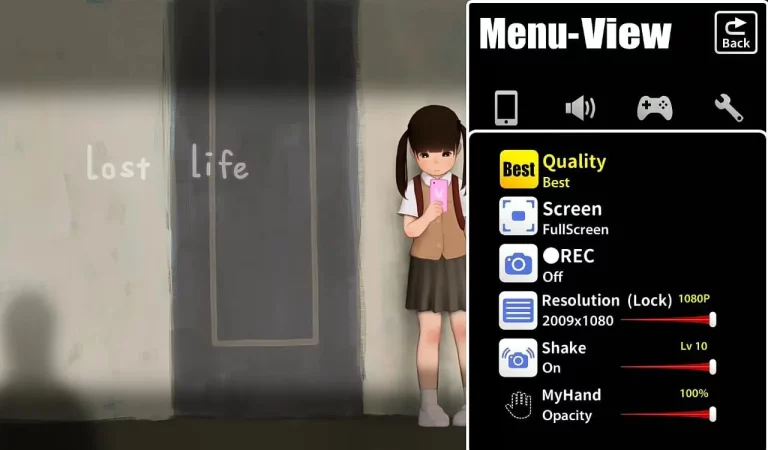
Access the settings menu to customize graphics frame rat resolution and opacity. Adjust sound and language options to fit your preferences.
Gameplay Basics
Tap the lobby screen to start. Interact with the schoolgirl character through simple taps her behavior changes based on your choices. Explore environments tap objects like the TV and phone and progress through the story. Each decision shapes your unique journey through the game.
Download and Lost Life
First, download and install the game on your device. From experience, getting it from the official Lost Life publisher page or another trusted platform ensures compatibility on Android, iOS, and PC. Always make sure your download source is genuine to keep your device secure and enjoy smooth gameplay without errors.
Familiarize Yourself with the Interface
Jump into this friendly well designed interface where each feature helps you learn the game basics. The menu gives you options to explore different parts of the game but the real fun starts when you dig deeper.
Tap around to discover what each option does uncovering the interface’s hidden gems makes the game way more engaging and helps you understand how everything works together.
Explore Settings
Customizable graphics allow players to adjust frame rate and resolution for optimal performance, while opacity controls enhance visual clarity during intense sequences. The sound effects and language settings provide comprehensive help to learn essential controls and understand progress mechanics before advancing to the next level.
Understand Your Role
Your Role in the Game
In Lost Life you make decisions that shape a schoolgirl character’s transformation. Your choices during school scenarios determine how her personality and behavior change over time.
Tap the screen at key moments to guide her actions but knowing when not to intervene matters too. The simple interface hides deep customization that lets you mold her personality from the start.
Every choice triggers consequences. Your decisions push the story in different directions with some paths leading to darker more intense outcomes.
Start Gameplay
When you’re ready to begin your journey, the environment responds to every screen interaction – simply tap to establish control over the multitude of interactive elements like the TV and phone while exploring your surroundings. Time becomes fluid as you connect with the schoolgirl character, discovering that having patience during these initial moments creates a more immersive deep experience than rushing through the opening sequences.
FAQs
Conclusion
I hope this guide has made your Lost Life experience smoother and more enjoyable helping you overcome challenges with ease. If you ever find yourself stuck remember to tap the question mark icon for helpful clues that keep your progress on track.
Lost Life combines mystery suspense and emotion in a way few games do. With the tips you’ve learned here you’re now ready to explore its secrets uncover hidden paths and experience every twist the story has to offer.
👉 For a detailed downloadable version, check out our LostLife APK Guide PDF with full installation steps and features.